Gym check-in software your members run themselves
A gym member check-in app that replaces the clipboard at the front desk. Members scan a QR code, class packs count themselves down, and you can see who stopped coming before the renewal lapses.
Free forever for 20 member profiles. No credit card.
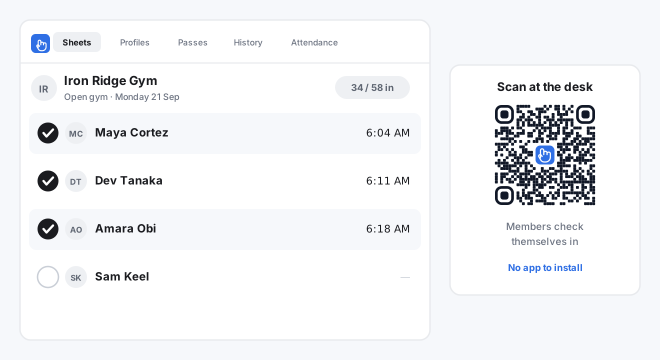
What gyms and fitness studios check in with OneTap
One Sheet per class, per day or per site. The same QR code works for all of it.
- Open gym check-in
- Fitness class attendance
- Class packs and punch cards
- Personal training sessions
- Member passes
- Day passes and drop-ins
- Multi location gyms
- Staff shift check-in
- Guest and trial visits
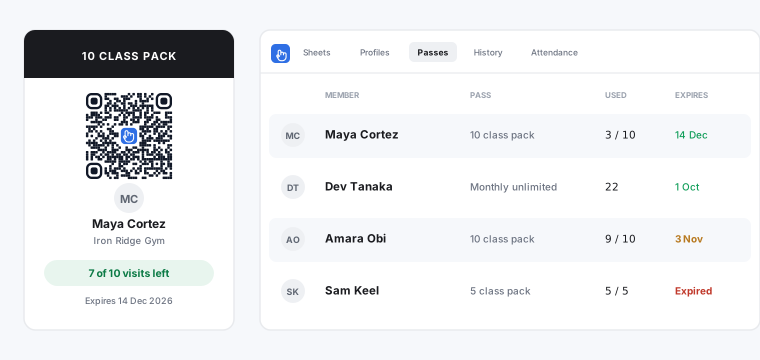
Class packs and gym passes that count themselves down
Issue a 10 class pack, a 5 visit punch card or a monthly unlimited as a digital pass on the member phone or in Apple Wallet. Every check-in takes one visit off by itself.
The passes screen shows visits used, visits left and the expiry date for every member, so the conversation about renewing happens before the pass runs out rather than after.
Everything a gym member check-in app needs to do
The parts of a gym attendance app you touch every day, and none of the parts you do not.
Members check themselves in
Print one QR code and put it on the front desk. Members scan with a phone camera and tap their name, or use an iPad kiosk if you would rather they did not use phones on the floor. Nothing to install and no account for them to create.
Class packs that count themselves down
Issue a 10 class pack or a monthly pass as a digital pass on the member phone. Each check-in takes one visit off, and the passes screen shows who is running low and whose pass has expired.
Check-out and time on site
Turn on check-out and every visit records an arrival time, a leave time and a duration. Useful for open gym, for staffed hours, and for anyone who has to show occupancy figures.
See who stopped coming
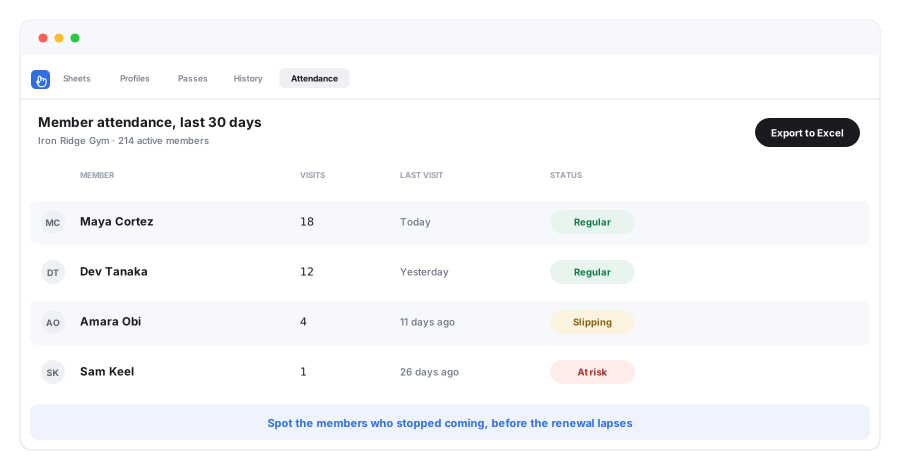
The member attendance report ranks everyone by visits and last visit, so a member who has not been in for three weeks is visible before the renewal comes round rather than after they cancel.
Which classes actually fill
Every check-in is attached to a session, so you can see which classes and which times people come back for, and staff the floor accordingly.
Works on the hardware you own
A phone, a spare iPad or the desktop at the desk. No turnstile, no scanner to buy, no per-door licence.
See which gym members stopped coming
Attendance is the earliest signal you get that a membership is about to lapse. It shows up weeks before the cancellation does.
Setting up gym check-in takes about five minutes
- 1
Add your members
Upload a CSV or Excel file of your membership, or share a registration link and let members add themselves on their first visit.
- 2
Put a QR code on the desk
Print one code per location. Members scan it with a phone camera. If you prefer a fixed station, run kiosk mode on any spare iPad.
- 3
Watch the Sheet fill in
Check-ins land live. Passes count down on their own, check-out records time on site, and the attendance report exports to Excel whenever you need it.
What OneTap is not
Worth knowing before you sign up. OneTap is check in software for gyms, not a gym management suite, and plenty of gyms run it alongside the system they already pay for.
It does not take payments
OneTap records that a member checked in and how many visits are left on their pass. It does not process card payments, run direct debits or chase failed billing. Keep whatever you use for money.
It does not book classes
There is no class booking, no waitlist and no capacity cap. If members reserve a spot in advance, you need a booking tool and OneTap sits alongside it as the record of who actually turned up.
It does not open doors
This is not access control. It does not drive turnstiles, fobs or magnetic locks, and it will not stop somebody walking in. It records attendance, accurately and with a timestamp.
Running a martial arts school? See martial arts attendance software. Tracking a club, association or community centre instead? See member check-in software.
Gym check-in software questions
What is gym check-in software?
Is there free gym check-in software?
How do members check in at the gym?
Can OneTap track class packs and punch cards?
Does OneTap replace my gym management software?
Can I see which members have stopped coming?
Does it work for fitness classes as well as open gym?
Can I use it across more than one location?
Put a QR code on the front desk this afternoon
Free forever for 20 member profiles, no credit card and nothing for members to install. Add your membership from a spreadsheet and print the code.
Paid plans start at $49.99 a month billed yearly for 250 members.