Adult Day Care Software for Attendance, Sign-In and Hours
Your staff sign participants in and out on an iPad as the van unloads. Time on site totals itself, you can see who’s in the building at a glance, and the month exports in the shape your funder or state reviewer asks for.
Free forever for 20 participant profiles. No credit card.
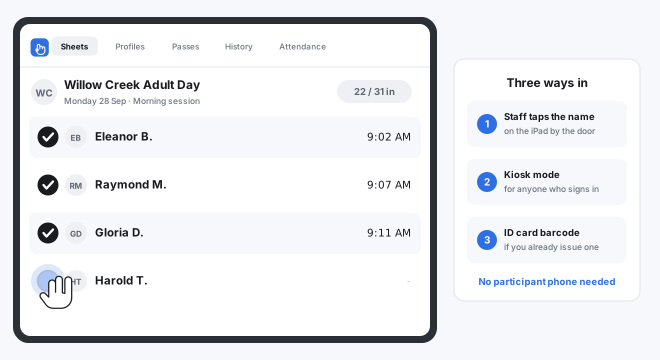
Adult Day Programs That Run on OneTap
One Sheet per program, per site or per day. The same record covers your participants, your staff and your visitors.
- Adult Day Health Centers
- Social Adult Day Programs
- Day Habilitation & IDD Services
- Senior Centers
- Memory Care Day Programs
- Veteran Adult Day Health
- Congregate Meal Programs
- Caregiver Respite Days
- Staff & Volunteer Sign-In
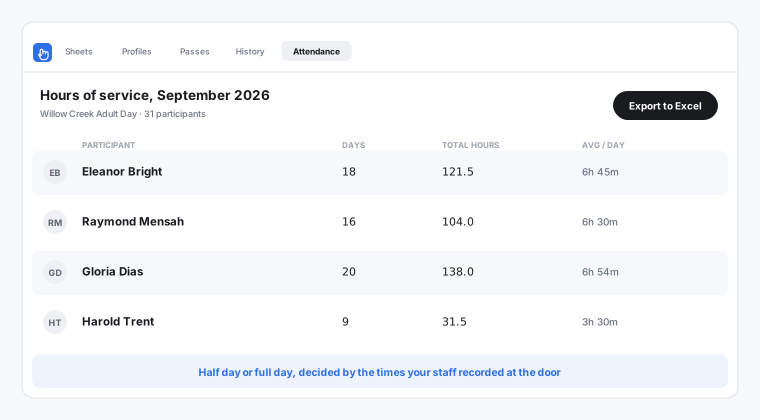
Hours of Service, Counted as They Happen
Turn on check-out and every participant record carries an arrival time, a departure time and a duration. Those durations total per person and per month without anyone adding them up.
When a half day and a full day bill differently, the difference is a number your staff recorded at the door on the day, not one reconstructed at month end.
Everything an Adult Day Program Needs to Track Attendance
The parts your center touches every morning, ready on the hardware you already own.
Staff Sign Participants In, No Phone Needed
A staff member taps names on an iPad as the van unloads, or runs a kiosk at the door for anyone who signs themselves in. Your participants don’t need a smartphone, an email address or an account.
Arrival and Departure Times on Every Record
Turn on check-out and every participant record carries an arrival time, a departure time and a duration. That duration is what half-day and full-day service units are decided on.
See Who Is in the Building Right Now
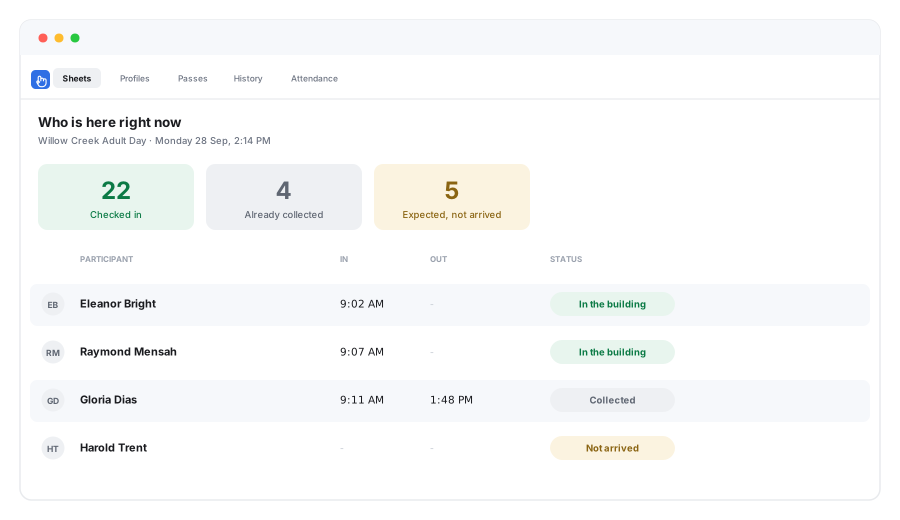
One screen shows everyone currently checked in and everyone expected who hasn’t arrived yet. It’s there on an ordinary Tuesday, and it’s ready the moment you need a roll call outside.
Record Who Collected Each Participant
Ask for a signature or a photo at departure and the record shows who collected each participant and at what time. When a family asks about a Thursday three months ago, you have the answer in seconds.
Exports Built for Funders and Reviewers
Filter any date range by participant, program or site and export to Excel, CSV or PDF. Days attended and hours per person per month, in the shape a state reviewer asks for.
Runs on the iPad You Already Have
A spare tablet at reception, a phone in a coordinator pocket or the desktop in the office. No badge readers, no turnstiles, no per-door license and nothing for participants to install.
Know Who Is in the Building During a Drill
Your roll call lives on the phone of whoever is standing outside with your participants, updating as staff check people off.
Start Tracking Adult Day Attendance in Three Steps
- 1
Add Your Participants
Upload the roster you already keep as a CSV or Excel file, with the custom fields you track such as program, funding source or transport route.
- 2
Put an iPad by the Door
Staff tap names as people arrive. Participants who sign themselves in can use the kiosk, and staff and visitors can scan a QR code instead.
- 3
Export the Month
Attendance lands live and time on site totals itself. At month end, filter the range you need and export it for billing, for a funder or for the file.
Works Alongside the Systems You Already Run
OneTap is the attendance record for your adult day program. It slots in beside your charts and your billing rather than asking you to move them.
Keep Your Care Plans Where They Are
OneTap holds the attendance record, not the participant chart. Assessments, care plans and clinical notes stay in the system you already trust for them, and your attendance stops being the part that’s still on paper.
Feeds Your Billing, Not a Replacement for It
You get the attendance and the hours a claim is built from, exported clean every month. Submitting the claim itself stays with your billing system, which is where your funding codes already live.
Fits Around Your Transport Schedule
Record which route a participant arrived on as a custom field and it appears on every export. Vehicle scheduling and driver manifests stay with whoever plans your routes.
Reporting attendance to a funder? See nonprofit attendance tracking. Looking for general attendance tracking instead? See the attendance tracker.
Adult Day Care Software Questions
What is adult day care software?
Is there free software for adult day programs?
How do participants check in if they can’t use a phone?
Can it record hours of service for billing?
Will the records hold up in a state audit?
Can we see who is in the building during a drill?
Can we record who collected a participant at the end of the day?
Does it work across more than one center?
Put an iPad by the Door on Monday Morning
Free forever for 20 participant profiles, no credit card and nothing for your participants to install. Upload the roster you already keep and start signing people in.
Paid plans start at $49.99 a month billed yearly for 250 profiles.