Employee Check-In App for Staff Attendance, Without the Paper Sheet
Staff scan a QR code at the door and they are checked in. See who is on site live, across every location, and export a report in one click. No timesheets, no GPS tracking, no payroll setup.
No credit card · Set up in about five minutes
Staff Check-In for Every Kind of Workplace
Anywhere people turn up to a place, OneTap records that they were there. One QR code per site, and no app for the people scanning.
Facilities and field crews
- Cleaning crews
- Janitorial teams
- Landscaping
- Security guards
- Maintenance
- Contractors
Multi-site operations
- Retail stores
- Restaurants
- Hotels
- Franchises
- Depots
- Distribution centres
Shift workplaces
- Warehouses
- Manufacturing
- Clinics
- Care homes
- Labs
- Workshops
- Safety meetings
- Toolbox talks
Offices and teams
- Hybrid offices
- Coworking desks
- Agencies
- Nonprofits
- Volunteer teams
- Seasonal staff
- Fire drills
What Is an Employee Check-In App?
An employee check-in app records that a member of staff was physically present at a location and time. Staff confirm their own arrival, usually by scanning a QR code at the entrance or tapping their name on a shared tablet, and the record is written to a live roster the manager can see and export. It differs from a timesheet or time-clock tool, which exists to calculate payable hours: a check-in app answers who was here, not how much do we owe them.
Because the roster lives in the browser, it doubles as an online employee attendance system: an online staff attendance register your managers can open from any device, with no server to run and no employee attendance application for staff to install.
Start Tracking Staff Attendance in Three Steps
Most teams are running in about five minutes. There is nothing to install and no hardware to buy.
- 1
Add your staff
Upload a CSV or Excel file, or share a registration link and let people add themselves. Names and emails are enough to start.
- 2
Put a QR code at each site
Print it and tape it by the door. One code per location keeps reports clean. No hardware, no installation, no per-site licence.
- 3
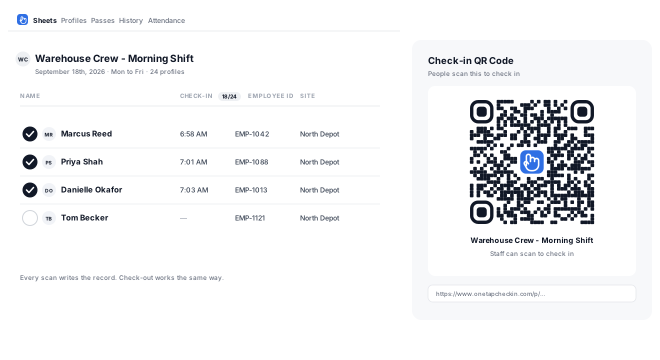
Staff scan, you get the record
Phone camera, tap a name, done. The roster updates live and check-out works the same way. Export to Excel or PDF any time.
Free Employee Attendance Tracking, With No Trial Clock
Up to 20 staff profiles, free forever. Not a 14-day trial that expires into a paywall.
What the free plan includes
- QR code check-in and check-out
- Live roster on any browser or the iOS app
- Unlimited locations and QR codes
- Excel and PDF exports
- CSV or Excel staff import
- Self-registration links
When you outgrow free
Paid plans add more profiles, more admin collaborators, SMS alerts and kiosk mode. Pricing is by number of profiles, not per site, so six locations cost the same as one.
See plans and pricing →Office and Multi-Site Staff Attendance Tracking
One office attendance tracker across every location. Two ways to set it up, and the right one depends on whether you need to prove who was where.
A list and a QR code per location
Each site gets its own roster and its own code. Reports stay clean per location, and you can give a site manager access to only their own list. This is the right setup when the record has to stand up to a client or an audit.
Or one list, with staff picking their site
Simpler to manage and everything lands in one report. The trade-off is honest: it relies on people selecting the right location, so it suits trusted crews more than compliance reporting.
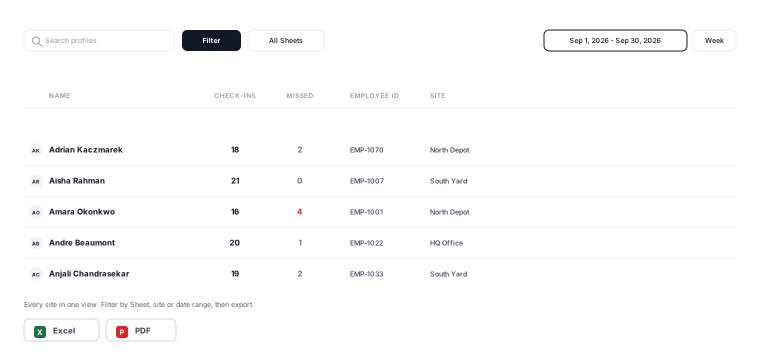
Unlimited locations on every plan, including the free one. You are charged for profiles, not sites.
Know Who Is in the Building for Fire Drills
The same roster people check into every morning is the one you carry outside at a drill.
A live roster at the assembly point
Open today's list on a phone at the assembly point and read the names out. It is the same record staff scanned into that morning, so there is no printed sheet to fetch from a building you have just left.
Contractors and visitors included
Anyone who scanned is on it, including a contractor who registered at the door that morning. Filter to a site so a drill at one depot shows only that depot.
What it can and cannot tell you
It shows who checked in, and who checked out if you have check-out turned on. It cannot know that someone slipped out without scanning, and it needs a connection to load, so treat it as a fast roll call rather than a life-safety system.
Four Ways Your Team Can Check In
Mix them freely. A site can run a wall QR code and a reception tablet at the same time.
QR code at the door
Print one code per site. Staff scan with the phone camera, with no app, no login and no account for them to remember.
Personal QR pass
Each person gets their own code by email or SMS, saved to Apple Wallet or Google Wallet.
Tablet kiosk
A shared iPad at reception. Staff tap their own name from the roster on the way past.
Admin check-in
A manager checks people in from the dashboard or the iOS app when a phone is not practical.
Related: QR code attendance · self check-in kiosk
Every Team Should Move From the Paper Sheet to OneTap
The same morning, before and after.
Before
- Paper sheet by the door, or a group chat
- You find out who was missing the next day
- Someone retypes it into a spreadsheet
- No record you would want to show a client
- Multiple sites means multiple sheets
After
- A QR code at every entrance
- Live roster, visible from anywhere
- The record writes itself as people scan
- Audit-ready Excel or PDF in one click
- Every site in one dashboard
Staff Attendance Tracking That Stops at Attendance
The employee attendance tracking software part, without the timesheet part. Enough of a record to settle a question, and nothing that turns your team into payroll data.
Live, not end-of-day
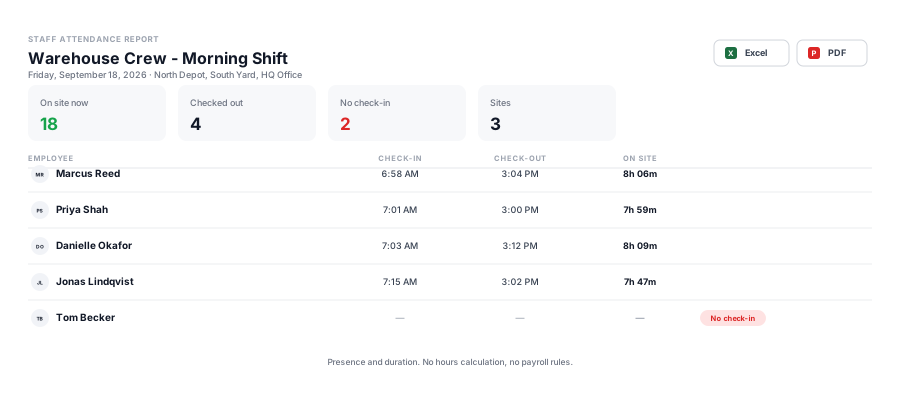
The roster updates as people scan, so you can see who is on site right now rather than reconstructing it later from a sheet.
Check-in and check-out
Both times are recorded, so a report shows presence and duration without becoming billable hours or an overtime calculation.
Exports that survive an audit
Filter by person, site or date range and export to Excel or PDF. The same export works for a client paper trail or a grant report.
From an Employee Attendance Sheet to a Live Roster
If you came looking for an employee attendance sheet, take the template. It works, right up until the day it does not.
Where a spreadsheet still wins
One site, a handful of people, and someone who is always at the door. A free Excel or Google Sheets attendance tracker template costs nothing and needs no account.
Get the free Excel template →Where it starts to hurt
Two sites and one sheet each. Someone retypes a paper list on Monday. A supervisor asks who was on shift last Thursday and the honest answer is that nobody wrote it down.
What replaces it
The same columns, filled in by the people arriving. Add your own fields, such as employee ID, department or site, and export the whole thing back to Excel or PDF whenever someone asks for a copy.
The export is a spreadsheet either way. The difference is who fills it in.
What OneTap Is Not
Worth saying plainly, so you can rule it in or out in the next thirty seconds.
Not a timesheet or payroll tool
OneTap does not calculate payable hours, handle overtime rules or run payroll. If that is what you need, a time-tracking product is the right category and will serve you better. OneTap records physical presence.
Not employee surveillance
No background location tracking and no continuous monitoring. Check-in happens because someone scans a code that physically lives at the site. Optional location restriction exists if you need it, and it is off unless you turn it on.
| Employee check-in app (OneTap) | Time tracking software | |
|---|---|---|
| The question it answers | Who was here, and when | How many payable hours are owed |
| Who records it | The employee, by scanning at the site | The employee or an automatic timer |
| Typical trigger | A QR code fixed at the entrance | A start and stop button, or a desktop timer |
| Needs an app installed | No, staff scan and use a web page | Usually yes, or a desktop agent |
| Handles overtime and pay rules | No | Yes |
| Works for a crew across many sites | Yes, one code per location | Varies, often per-seat licensed |
| Best for | Confirming physical presence | Payroll and billable hours |
Tracking attendance for training sessions or compliance courses instead? That is a different job, so see employee training attendance.
Employee Check-In Questions
How can I track office attendance automatically without manual check-ins?
Is there a free employee attendance app?
Can I track staff attendance across multiple locations?
Do employees need to download an app?
Is this a timesheet or payroll tool?
Does it use GPS to track employees?
Can I use this instead of an employee attendance sheet in Excel?
Can I track who came into the office on hybrid days?
Can I use it for a fire drill roll call?
Can I track safety meeting and toolbox talk attendance?
How do I import my staff list?
What reports can I get?
Check your first crew in this afternoon
Add your staff, print a QR code, and you are running. Free for up to 20 profiles, and nothing to install for the people scanning.
20 profiles free forever · No credit card · Unlimited locations