We’ve made the Pass Scanner on the Web Kiosk faster between scans. As soon as one Pass checks in, the camera is ready for the next, so people can scan back to back without waiting on the 5 second reset timer that used to slow down the queue.
The pause between every badge
One of you was testing the Pass Scanner on the Web Kiosk ahead of a monthly meeting where around 900 people check in and out. The camera stayed open the whole time, but after each scan it went quiet for several seconds before it would read the next Pass, even with the next badge already held up to it.
A few seconds doesn’t sound like much until you multiply it. At five seconds a person, 900 people adds up to more than an hour of standing still.
Scan, step aside, next
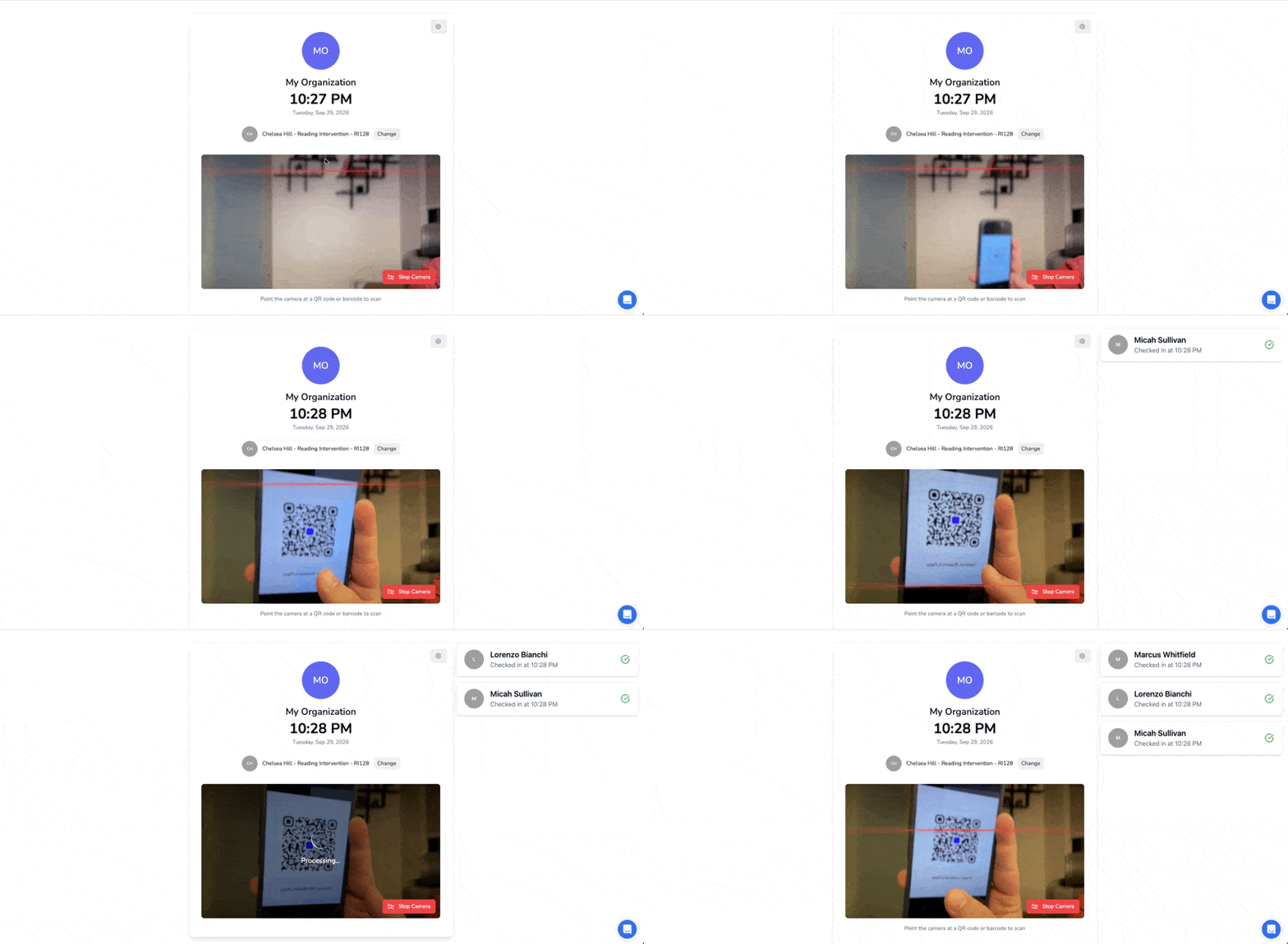
That pause is gone. The screen confirms the check-in and goes straight back to looking for the next Pass, so whoever is behind can hold theirs up the moment the person ahead steps away.
Something like this:
Run a test this week!
Grab two Passes, open the Pass Scanner, and scan them back to back.
Open Web Kiosk
(Attendance tab → Actions → Open Web Kiosk)
Before scanning a pass, make sure both people are on the Sheet selected in the Web Kiosk, or their Passes won’t check in.
If your line still stalls anywhere, reply here and tell us where it fails.