







Set Up Your Next Event
Check-In App for Campus Events

Know Exactly Who Showed Up. Without a Single Paper Sign-In Sheet.

Students scan a QR code or check in on a shared iPad kiosk at the door. See attendance live, then export a clean attendance record as soon as your event ends.

Set Up Your Next Event

No credit card required.
Ready for your next event in minutes.

Student scanning a QR code to check in
Check-in QR code
Scan to check in
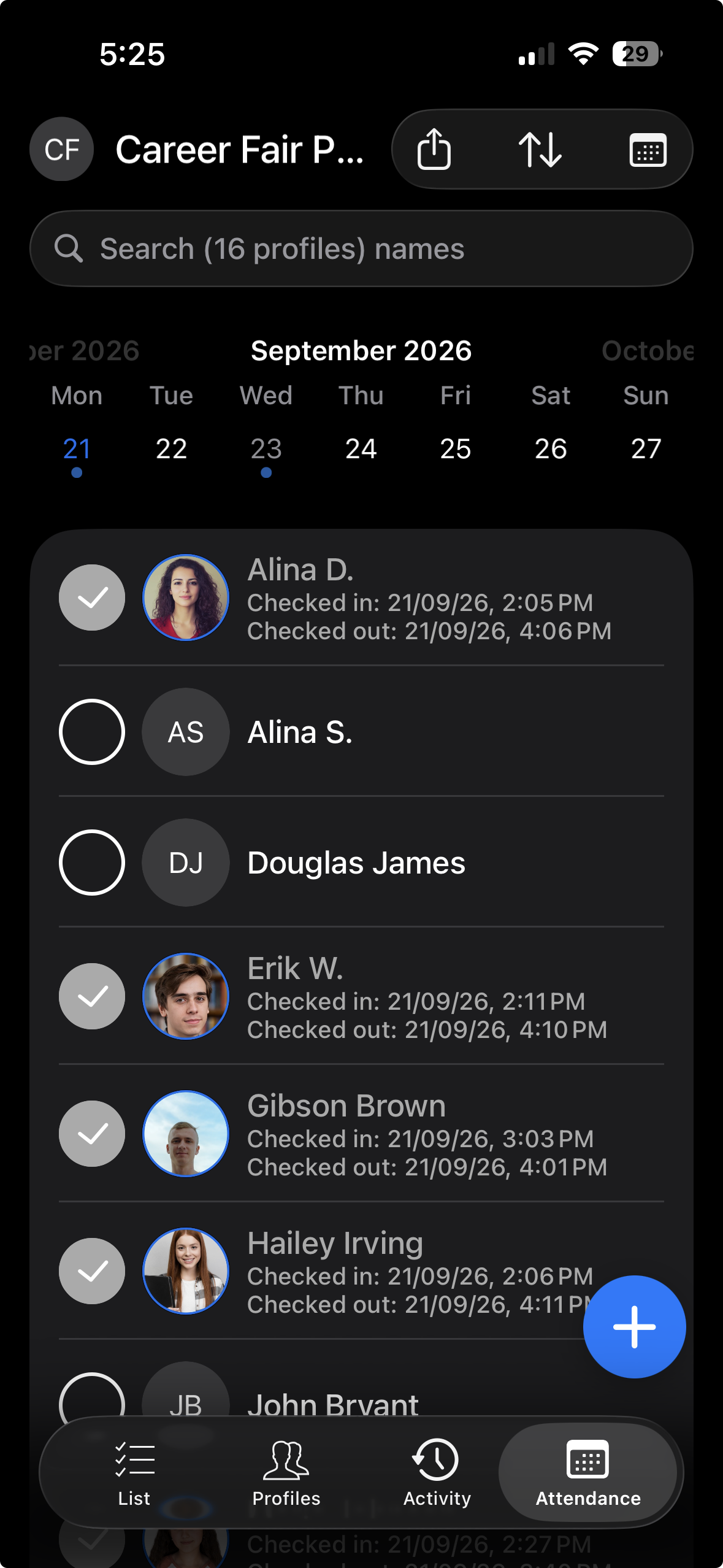
OneTap dashboard showing a live campus event attendance list with check-in and check-out timesThe same live attendance list on the OneTap mobile app

Trusted by campus teams across the U.S.

  • Industry-standard encryption
  • US-based data centers
  • We never sell student or event data
OneTap customerOneTap customerOneTap customerOneTap customerOneTap customerOneTap customerOneTap customer
Attendance on autopilot

From paper chaos to a clear attendance record.

Replace paper sign-in sheets, hand counts, and spreadsheet cleanup with automated attendance tracking that records every check-in as it happens.

The Old Way

Crowded-door with paper sign-in sheet

SIGN-IN SHEET · Welcome Week

Maya J. ✓

Diego R.

~ illegible ~

Tomas N.

Illegible handwriting

Headcount by handLost count around 47…
attendance_FINAL_v7_USE_THIS_ONE.xlsx
Maya J.9/26:12P
Diego R.9/26:??P
Tomas N.#N/A?
Who came to the fair??
  • Squinting at illegible sign-in sheets
  • Counting heads by hand mid-event
  • Re-typing names into a spreadsheet after
  • RSVPs that don't prove who actually came
  • No clear record of which programs students actually attended
  • Leadership asks for the attendance report - and you are still cleaning up the sign-in sheet.
The OneTap Way

A clean record without the cleanup

OneTap · All ProgramsLive
EventDateCheck-ins
Welcome Week KickoffSep 2212
Involvement FairSep 4486
Leadership WorkshopSep 938
Chapter MeetingSep 1054
Guest LectureSep 11129
  • Students check in by QR code, iPad, or staff phone
  • Every check-in is recorded as it happens
  • See the live attendance count during the event
  • Export a clean roster to Excel, CSV, or PDF
  • Compare attendance across events in one place
  • Share a ready-to-use attendance report with your team
What student coordinators & campus teams love

Everything you need to get students checked in and prove they showed up.

Create an event, share a QR code, and add your student staff without waiting for IT or buying event hardware.

In the room
MJMaya Johnson
DRDiego Ramirez
ALAisha Lee

Know who attended

Get a verified, duplicate-free record of everyone who checked in. Not a rough headcount, guess, or RSVP list.

QR code students scan to check in
Scan to check in
iPad kiosk · QR · staff phone

Move the line faster

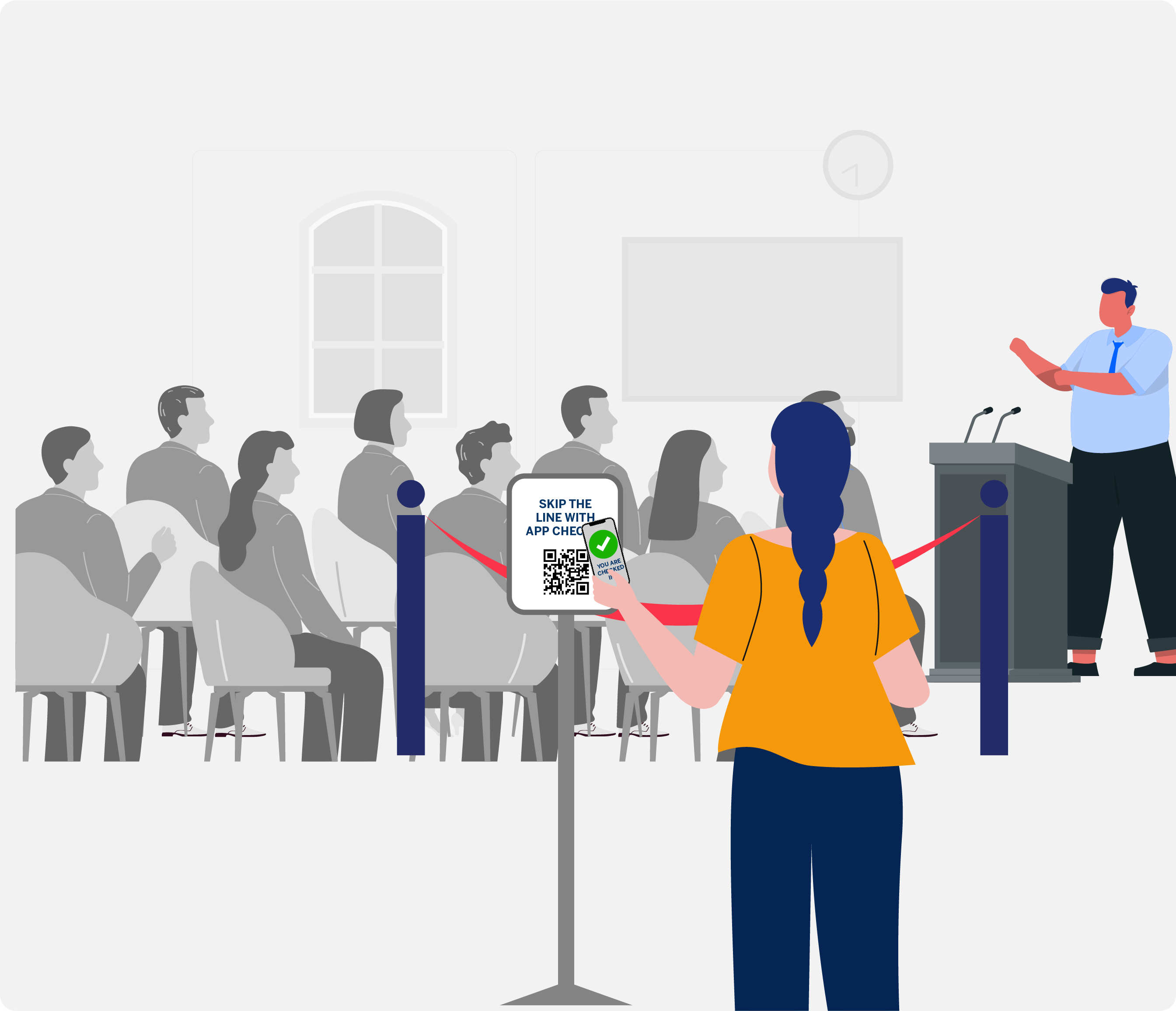
Let students scan a QR code, use a shared iPad, or check in with a student worker. The line keeps moving.

Welcome Week Kickoff
Search your name…
New here? Add yourself.
Register & check in

Register walk-ins on the spot

Add students, guests, and late arrivals in seconds. No separate form or registration desk.

Welcome Week KickoffLive
checked in and counting

See the live count

Watch check-ins update as students arrive, so your team always knows how many people have attended.

Collaborators
RKRiley KimAdmin
JPJordan ParkVolunteer
Add teammate

Student workers can run it

Add student staff or volunteers as collaborators. They run check-in from their own devices, with no clipboards or shared logins.

Attendance report
ExcelPDF

Export your report right away

Download a clean attendance report when the event ends. Ready for follow-up, participation reporting, or your next budget conversation.

Built for every campus program

Whatever you're running this term, OneTap counts the room.

From orientation and career fairs to chapter meetings and speaker events, coordinators use OneTap to see who attended - not just who registered.

One account for every campus program.Also used for recreation, service events, cultural programs, wellness workshops, student government, and campus-wide event series.

Real coordinators. Real campus events.

Teams say OneTap made attendance the easy part.

Manual sign-ins were disrupting every class. Now students scan one QR code on the way in, and I get an exact record of who showed up and who came late, without stopping the session.
James F.James F.Graduate Course Instructor
There's a thing in Canvas that you can use that is really not user friendly. I am going to share this with my other professors because this is what you want. This is easy.
Ginny A.Ginny A.Professor · Chico State University
Attendees check themselves in on the iPad or scan a QR, we register walk-ins on the spot, and my whole team works from the same dashboard. The report after the event is one click.
Mary C.Mary C.Program Coordinator
Live in minutes, not a semester

Set it up once. It runs every event after that.

You can set the whole thing up yourself before your next event, on the phones and iPads your team already has.

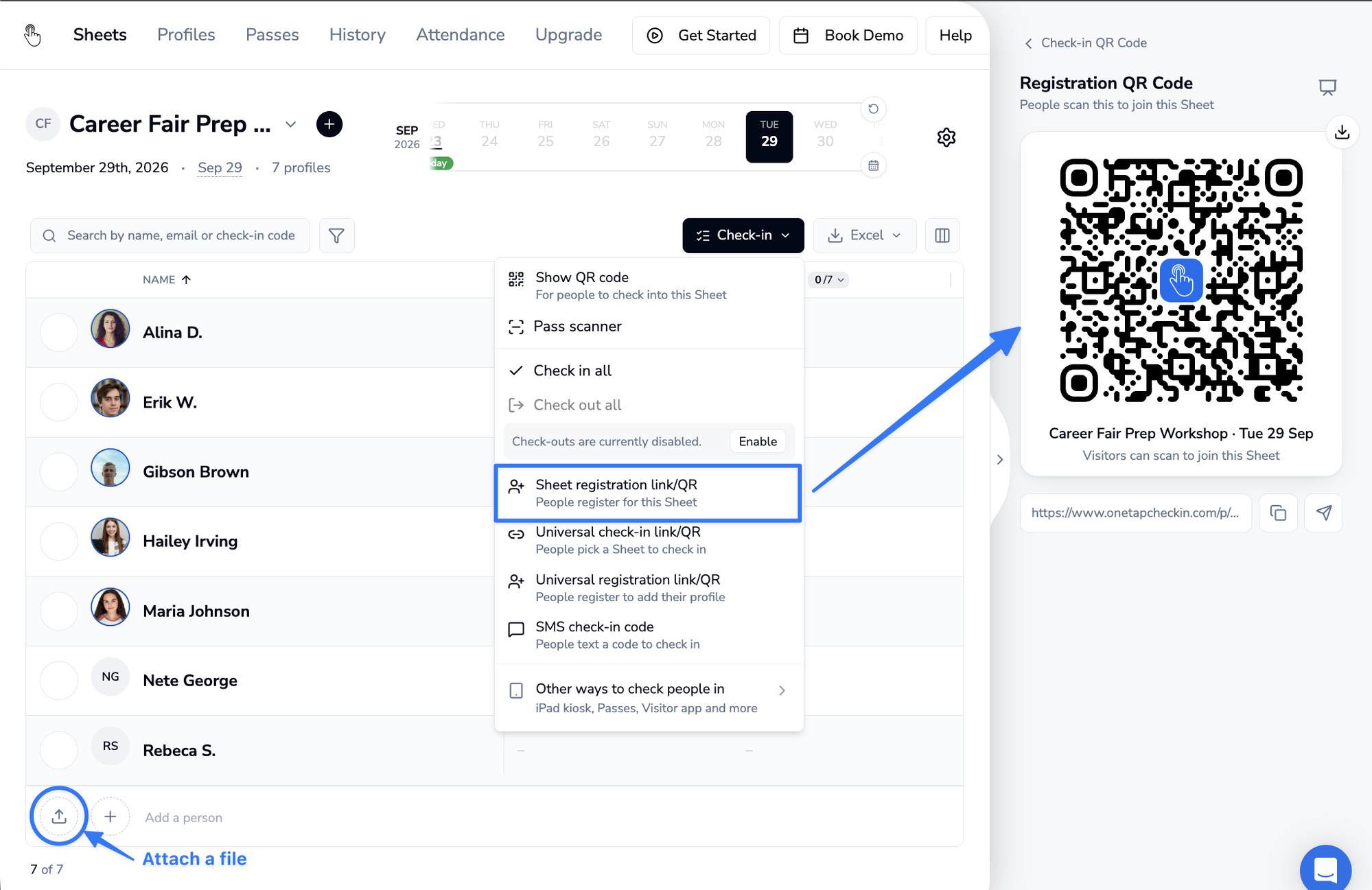
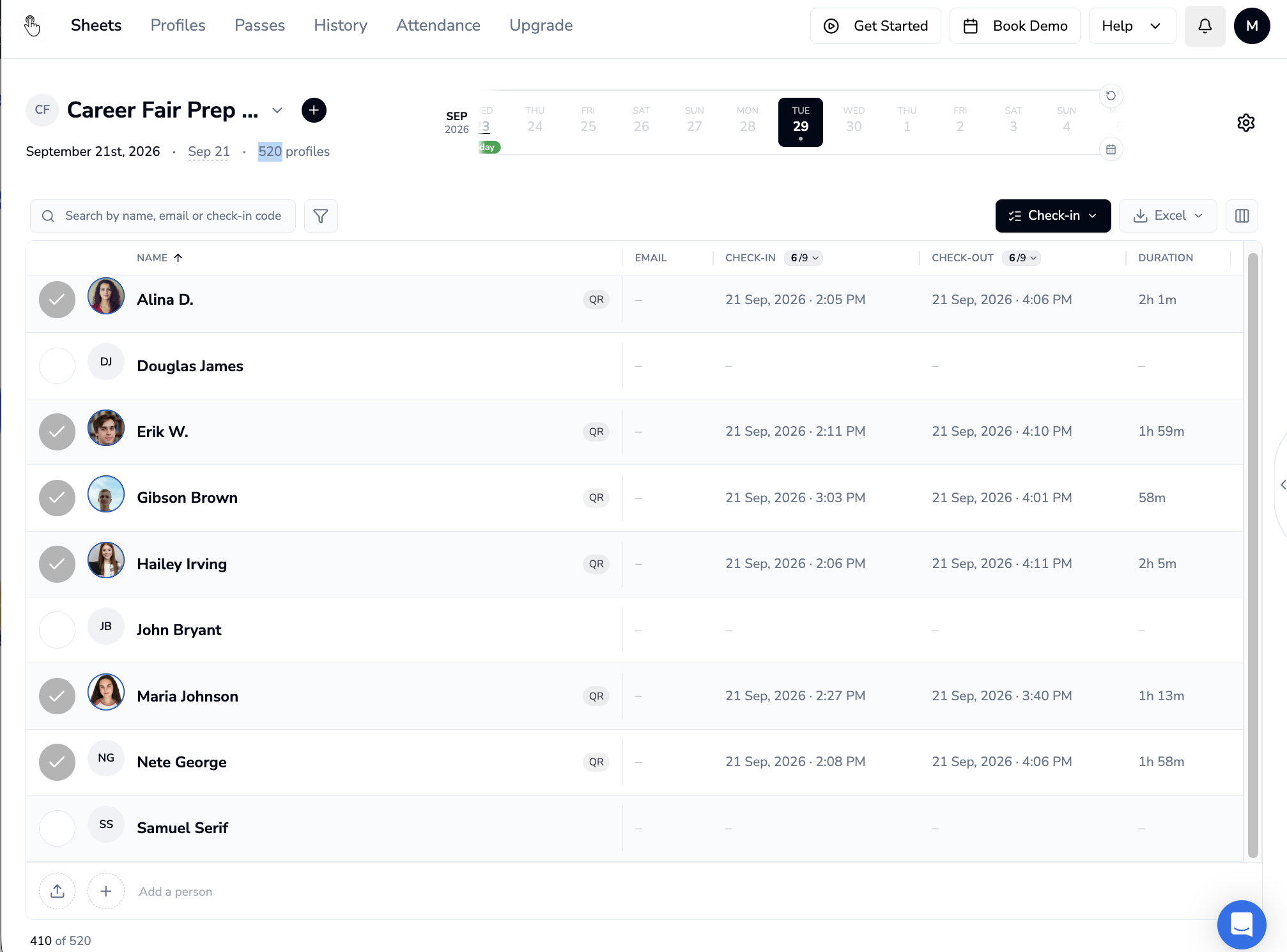
OneTap dashboard showing a Career Fair Prep sheet with the registration QR code panel open

Create the event or session

Import your roster from Excel, or share a registration QR so students add themselves. Add custom fields (like Student ID or T-shirt size) and you are ready. Reuse the same list for recurring weekly meetings.

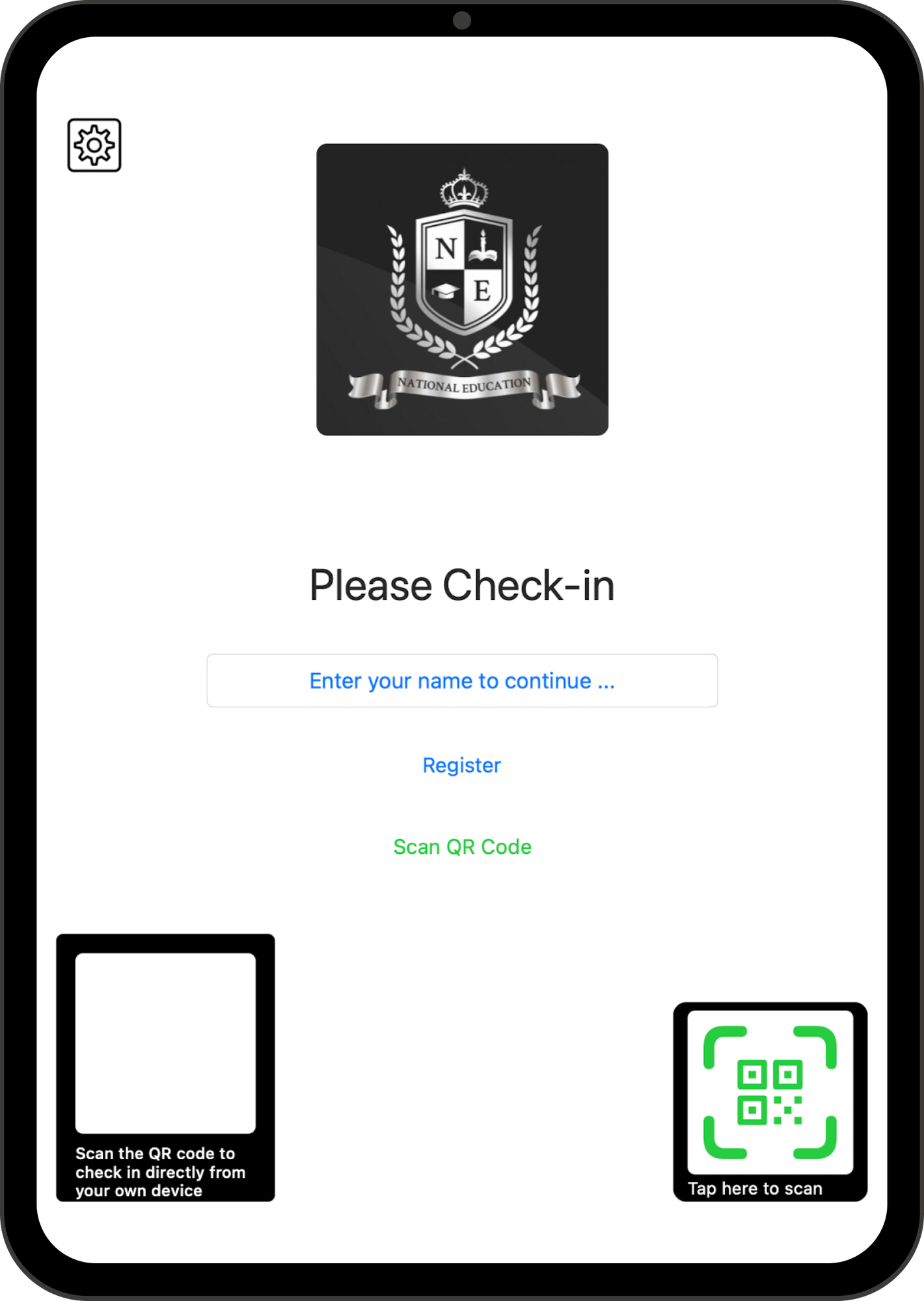
OneTap iPad kiosk check-in screen where students enter a name or scan a QR code

Check students in by QR or iPad

Project your QR code or set up an iPad kiosk at the door. Students scan with their phone camera - no student app or account required. Watch the live headcount update instantly.

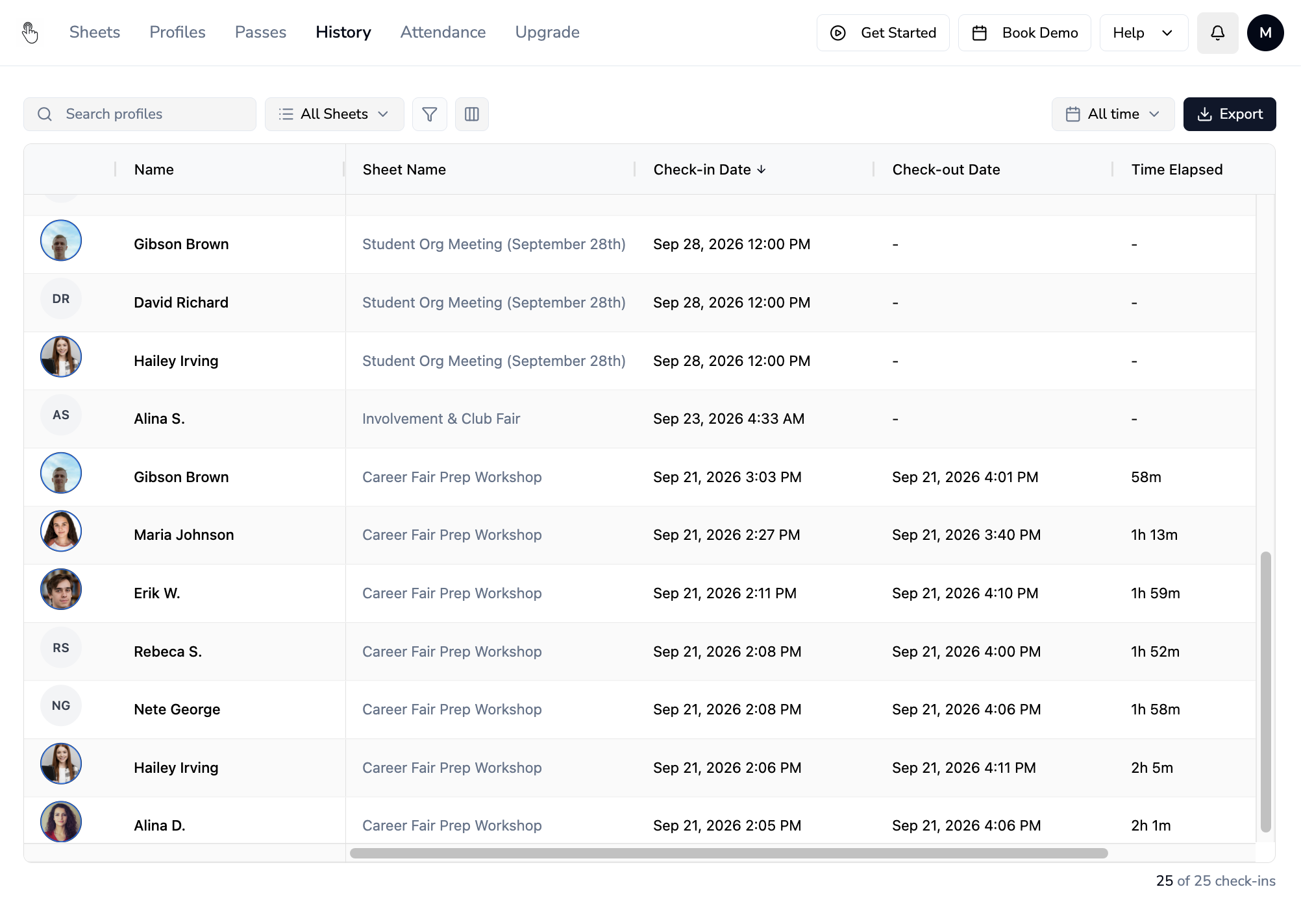
OneTap attendance history table showing check-in and check-out times across campus events, ready to export

Export a clean attendance report in one click

Download the roster as Excel or PDF the moment your event ends. Ready for follow-up, participation reporting, or your budget meeting.

Set Up Your Next Event

Free for up to 20 student check-ins. No credit card.

The fast check-in layer, not another platform to roll out

Keep your campus tools. Add the check-in layer your event team needs.

Keep the registration tools your campus already uses. OneTap handles the event-day work: fast QR and iPad check-in, live attendance, and clean reporting.

What your team needsPaper sheets & spreadsheetsExisting registration or campus platformOneTap
Be ready for your next eventManual setup and cleanupMay require existing setup, permissions, or admin supportCreate an event and start check-in in minutes
Check students in quickly at the doorPaper sign-in and manual headcountsVaries by platform and campus configurationQR, shared iPad, or staff-phone check-in
Register walk-ins as they arriveHandwritten additions and duplicate entriesVaries by registration workflowAdd students, guests, and late arrivals on the spot
Let student workers helpClipboards and manual handoffsMay require platform access or admin permissionsAdd student staff as collaborators
See and report attendanceCount manually, then re-type namesReporting varies by systemSee a live count and export a clean report
Run recurring programsSeparate sheets for every meetingMay require repeated setupKeep weekly meetings and program series in one place
Track arrival and full-session attendanceManual timestamps or a second paper sheetVaries by platform and configurationRecord check-in and check-out times for every attendee
Reduce students checking in for friendsAnyone can sign in for an absent friend or submit a name outside the eventRestrictions vary by platform and campus setupUse location, device, time-window, and refreshing-QR controls for more reliable in-person check-ins

Keep what your campus already uses. Add the fast check-in layer your event team needs.

Simple pricing for campus events

Pay for one event, or run them all term.

Pick a one-time Event Pass for an upcoming program, or an annual plan for recurring campus events.

For one upcoming event
$39.99 one time
Active for 14 days. One payment, no subscription.
Attendee profiles200
502005001,000
Start Free

Designed for a simple department-card purchase.

Run QR or iPad check-in for a single fair, workshop, orientation session, or speaker event.

Everything included

  • 5 collaborators
  • 200 SMS credits for admins
  • Personalized QR passes
  • iPad kiosk check-in
  • Check-in QR codes

Start with up to 20 attendee profiles free. Upgrade from your dashboard.

Event starting soon?

Set it up at 10:00 AM. Start checking students in by 10:30.

Your next campus event doesn't need another messy paper sign-in sheet. Create your account, pull up your QR code or iPad kiosk at the door, and watch attendance update live as students arrive.

Set up your next event freeUp to 20 students free. No credit card required.
CLEARING THE RED TAPE

Questions coordinators ask before buying.

Do I need campus IT to set this up?

No. OneTap runs entirely on the web and iOS. You do not need to submit an IT ticket, wait for a campus-wide server integration, or schedule a software rollout. You can set it up yourself today and use it tonight.

Can I pay with my departmental P-Card?

Yes. At $1,199/year, the Pro Plan falls safely under standard university discretionary P-Card limits. You get an instant itemized PDF invoice for your expense report, meaning you can often bypass the procurement committee entirely.

Do students need to download an app or create an account?

No. Students simply point their phone camera at your QR code, or you can scan them in on an iPad. They never have to download an app, create an account, or remember a password.

Will this replace our official campus platform (like Engage or CampusGroups)?

No. Keep your campus platform for official university registration and promotion. Coordinators use OneTap specifically as their high-speed "door check-in layer" because it won't crash when 300 students show up at the exact same time.

Can student workers help scan without messing up the data?

Yes. You can invite student staff and volunteers as "Collaborators." They can scan students using their own smartphones without needing your login, and they cannot delete your master attendance records.

What happens when unregistered walk-ins show up?

You can register them on the fly. Students can scan a specific walk-in QR code to instantly add their name and Student ID to the roster without holding up the line or sending them to a separate desk.

Can we track if a student stayed for the whole session?

Yes. You can track both check-in and check-out times. Your final export will show exactly how long each student was in the room—perfect for mandatory orientation seminars and Greek life compliance.

How do we get the data to our department head after the event?

The second your event ends, click export. You will instantly download a clean, duplicate-free CSV or Excel roster ready to email to your director or upload into your main campus database.

Is student data secure?

Yes. All data is encrypted in transit and at rest (AES-256) and safely stored in US-based data centers. If your university does require a standard security review, reach out and we will immediately provide the documentation your IT team needs.

Set up your next campus event for free. No credit card required.Get Started →